Owlly
RECIPES AND FOOD COST · FROM PROFESSIONAL

Your invoices calculate your food cost

Every plan includes automated invoice capture. Higher plans add depth.

Food cost from invoices means computing a dish’s cost from the actual purchase prices taken off purchase documents rather than from prices typed in by hand — so the cost recomputes on the day the supplier changes their price list.

Last updated:

6
Integrated modules
1
Platform for the whole restaurant
12 000+
Invoices processed in Owlly
live
Data always current

How does the system know my ingredient prices?

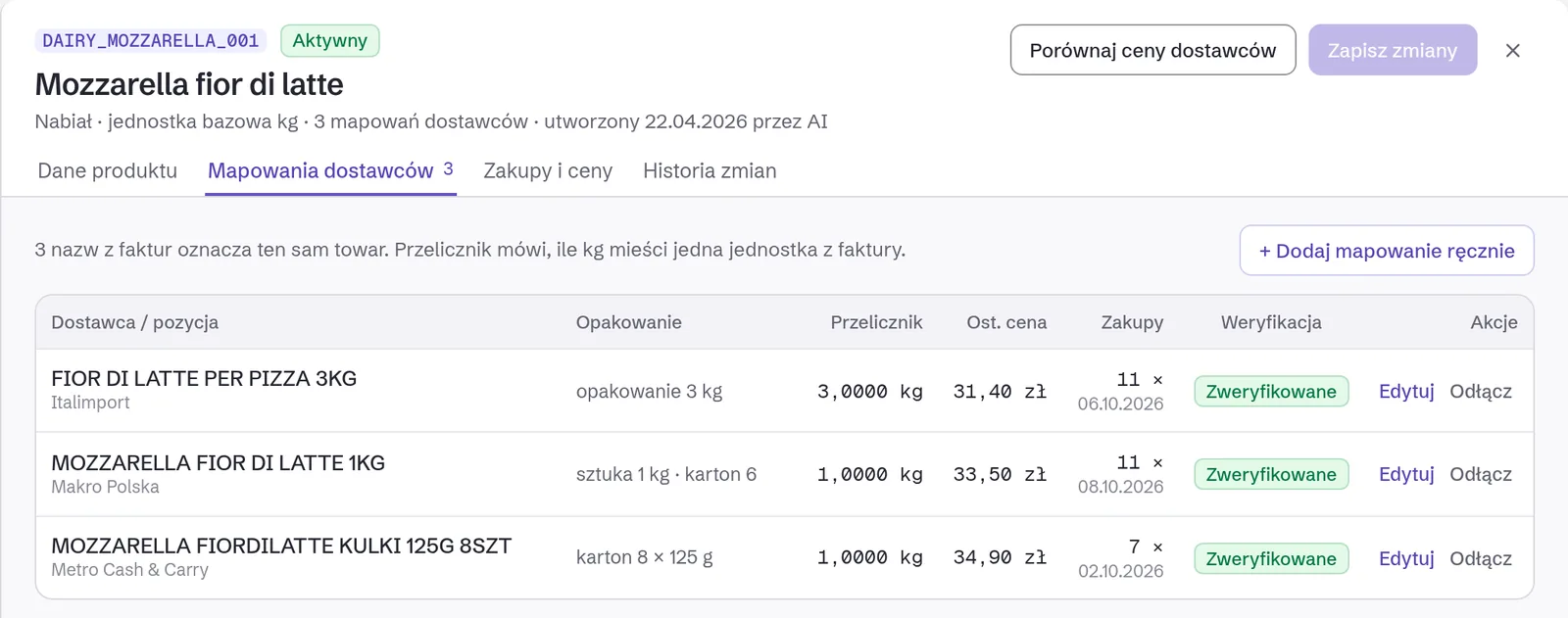
From your purchase invoices — from KSeF, from an email inbox, and from photographs of paper documents. Every line is matched to an ingredient in the canonical base, so the same beef from three suppliers has one price and one history.

The recipe is costed at those prices, not at a market average. Two matches in a hundred are uncertain — those come to you, the rest post themselves.

What happens when a supplier raises a price?

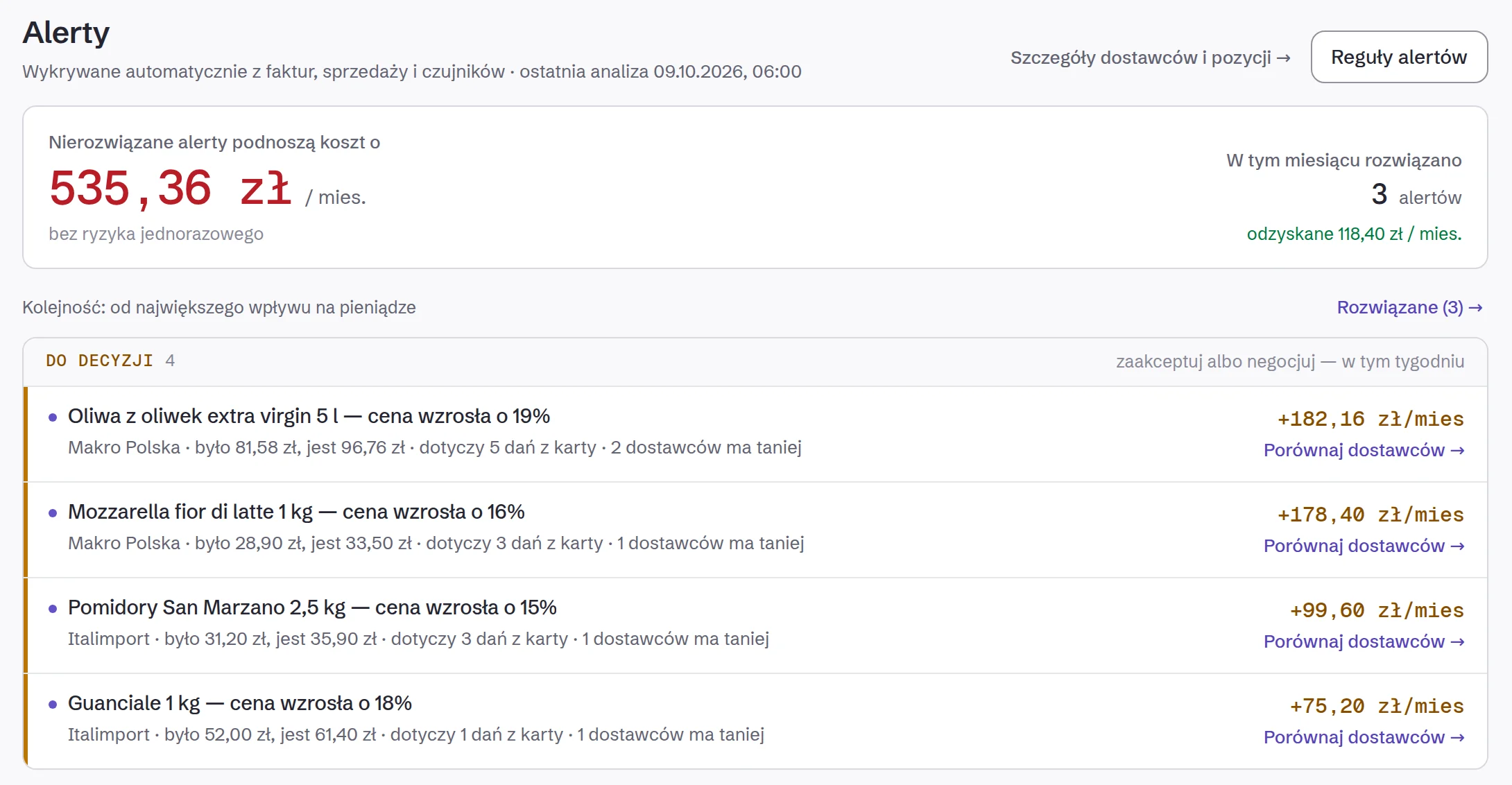
The cost of every dish using that ingredient recomputes on the day the invoice with the new price arrives. Beef up 8.2% means twelve recomputed dish cards and one alert — the 180 g burger crossed the 30% threshold.

Owlly shows the price that restores the previous margin. The decision is yours, the number is ours — and it arrives on the day of the rise, not after the month closes.

Do I have to enter recipes by hand?

You do not have to retype them. You photograph the handwritten card from the back of house, and the system reads the ingredients and quantities and matches them to the base. You confirm only the matches it is unsure about.

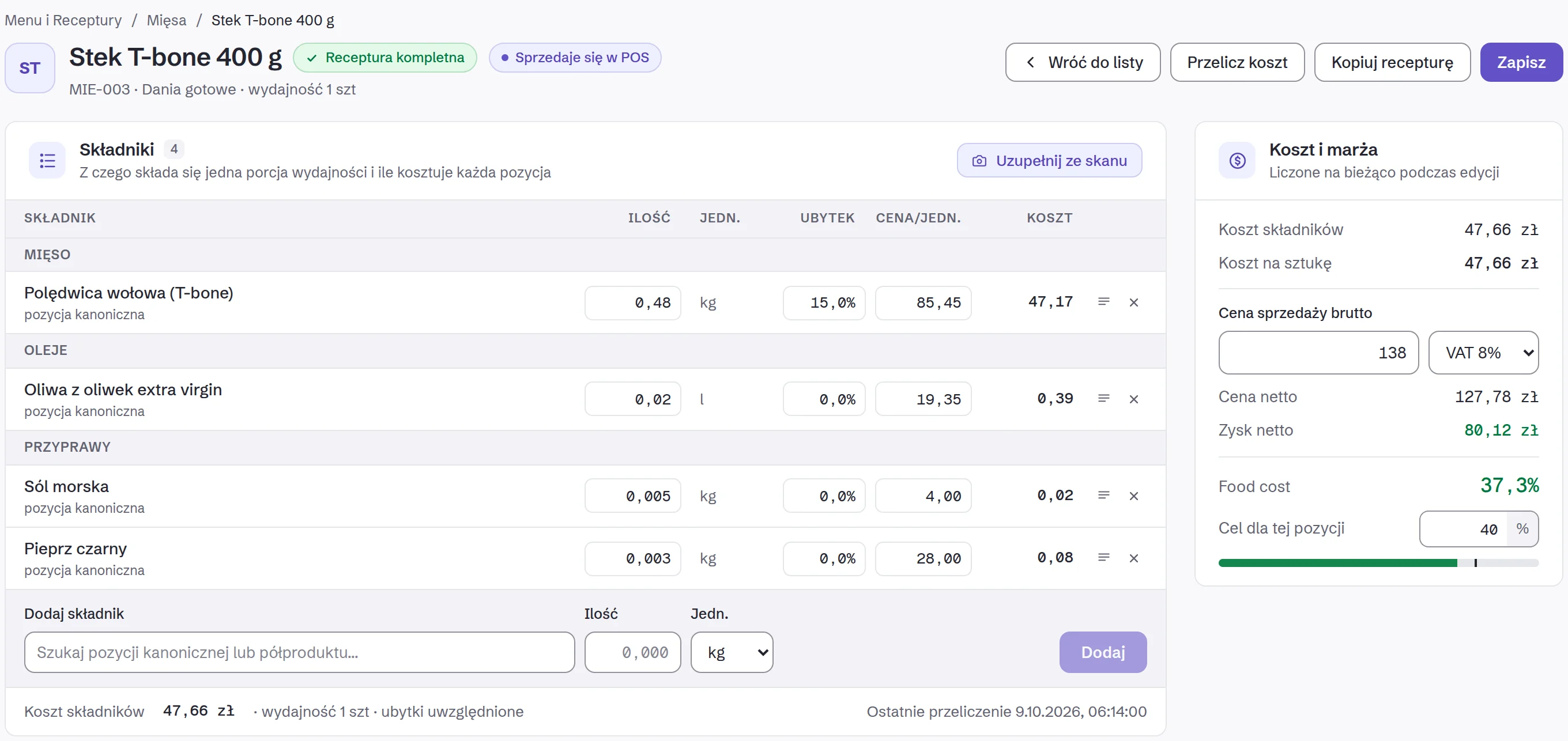
A sauce or a filling is its own recipe and enters dishes as a single ingredient with its own cost per litre. A change in the price of oil recomputes the sauce, and the sauce recomputes every dish it appears in.

What does a costed recipe look like?

Ingredient, quantity, cost — with the row that made the difference tinted. Portion cost next to the menu price, food cost as one number, and the threshold as a line you can see has been crossed.

Food cost is computed on net. The menu price includes VAT, but VAT is not your revenue — computing on gross understates the result by several points and creates a false sense that the menu adds up.

How is this different from a spreadsheet?

 SpreadsheetOwlly
Where the ingredient price comes fromtyped in once, by handfrom every invoice, on the day it arrives
A supplier price risevisible at the next updaterecomputes 12 dishes the same day
The same beef from three suppliersthree rows, three pricesone ingredient, one weighted price
A sub-recipe (sauce, filling)a price copied from another sheetits own recipe with its own cost per litre
A food cost thresholdnonea push on the day it breaks
A recipe from a paper cardretypingphotograph, read, confirm the uncertain ones

All modules

One platform — the whole restaurant under control

Invoices and KSeF

Automatic capture from KSeF, email, POS, camera and scanner. Zero manual entry.

Food cost & BOM — know your real margin per dish

Define recipes with ingredients and quantities. Owlly pulls actual prices from your processed invoices and calculates the true cost of every dish in real time. When a supplier raises a price, your food cost updates automatically and you receive an alert. No spreadsheets required.

Stock management — real-time levels across all locations

Every invoice received updates your stock levels automatically. Track movements, set reorder points, get low-stock alerts and reconcile physical counts against system data — across one location or fifty branches.

HR & scheduling — staff schedules built automatically

Build weekly staff schedules with constraint management. Employees submit availability via a self-service portal. The scheduler fills in the rest based on labour cost targets and operational rules.

Forecasting

Revenue and cost forecasting from your own history and seasonal trends.

Payment tracking

Invoice aging, due-date alerts and the status of every payment — straight from invoice data.

One platform. Three depths.

KSeF Start handles the mandate and everything your invoices already tell you — payments due, supplier price rises. Business adds HR: scheduling, labour costs, the employee portal. Professional adds food cost, stock and Owlly POS (early access).

Invoice ProcessingEVERY PLAN

Invoices captured from every source — KSeF, email, camera scan, POS — and stored automatically. Never touch a PDF manually again.

KSeFEVERY PLAN

Pull invoices directly from Poland's national e-invoice system. Fully automatic — new invoices appear in Owlly the moment they are issued.

Email ImportBUSINESS+

Connect Gmail or any IMAP mailbox. Owlly reads incoming emails, extracts invoice attachments, and processes them automatically.

AI ExtractionEVERY PLAN

Supplier, item, quantity, price, VAT — extracted from every invoice in under a second. PDFs from accounting systems are read close to flawlessly from day one.

Master DataPROFESSIONAL

Central product and supplier database. Canonical names keep your data clean across all branches and suppliers.

Food Cost & BOMPROFESSIONAL

Define recipes, calculate real food cost per dish, track margins, and get alerted when ingredient prices change. Know your actual profitability.

Stock ManagementPROFESSIONAL

Real-time stock levels updated by every invoice received. Movement history, reorder alerts, and variance tracking across all locations.

Inventory CountPROFESSIONAL

Digital count sheets on any device. Compare physical counts to system stock, get variance reports, and reconcile in minutes.

Payment TrackingEVERY PLAN

Full invoice aging, due-date alerts, and payment status — so you never miss a payment or get surprised by overdue bills.

Demand ForecastPROFESSIONAL

Advanced AI forecasting for sales, purchasing, and staffing. Seasonal patterns, event impact, and multi-branch aggregation.

HR & SchedulingBUSINESS+

Build weekly staff schedules with constraint management. Employees submit availability via self-service portal — scheduler fills in the rest.

Smart MonitoringBUSINESS+

Automatic alerts when a supplier raises prices, a regular delivery goes missing, or purchase volumes deviate from norms.

POS Integrationwczesny dostępPROFESSIONAL

Real-time sales and consumption sync — works with the till you already run. Feed actual sales data into forecasting and food cost.

14-day free trial · no credit card required

Questions about computing food cost

01How does the system know my ingredient prices?

From your purchase invoices — from KSeF, from an email inbox and from photographs of paper documents. Every line is matched to an ingredient in the canonical base, so the same beef from three suppliers has one price and one history, and the recipe is costed at those prices rather than at a market average.

02Do I have to enter recipes by hand?

You do not have to retype them. You photograph the handwritten card from the back of house and the system reads the ingredients and quantities and matches them to the base. You confirm only the matches it is unsure about — the rest post themselves.

03What happens when a supplier raises a price?

The cost of every dish containing that ingredient recomputes on the day the invoice with the new price arrives. If a dish crosses the food cost threshold you set, you get an alert the same day — not after the month closes, when nothing can be done about it.

04Is food cost computed on net or gross?

On net. The menu price includes VAT, but VAT is not your revenue — you hand it over. Computing on gross understates food cost by several percentage points and gives a false sense that the menu adds up.

05Do I have to change my till to compute food cost?

No. Food cost is computed from purchase invoices and recipes rather than from sales, so Owlly runs alongside the till you already have — with no refiscalisation and no change of printers.

06How does it handle sub-recipes?

A sauce or a filling is its own recipe and enters dishes as a single ingredient with its own cost per litre or kilogram. A change in the price of oil recomputes the sauce, and the recomputed sauce recomputes every dish it appears in — without copying the result into several places.

14-day free trial · No credit card required · Cancel anytime

Start 14-day free trial

Cost your first dish from your own invoices this week.

14 days of full Business. No card and no onboarding fee.

Start for freeFull pricing